
Dry Run Whiteboard for LeetCode
Coming soon to the Chrome Web StoreDry-run LeetCode on a whiteboard beside your code.
A whiteboard over LeetCode's problem page that draws the examples, steps your pointers and fills the trace table.
Free. Version 1.0.3. Works in Chrome, Edge, Brave, Arc and Firefox.Privacy policy
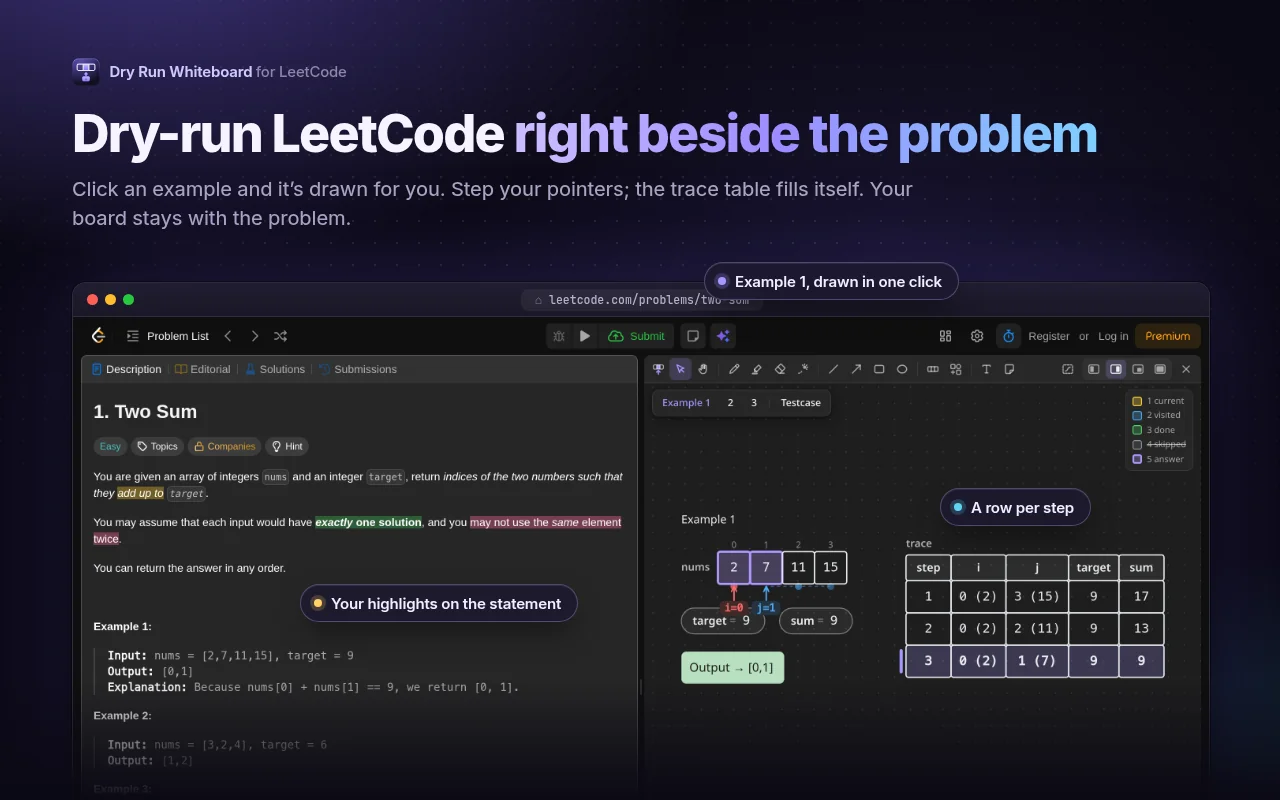
Two Sum with Example 1 drawn on the board beside the problem, pointers on the array and a trace table
What it does
- Drawn from the problem
- One click on an example, or on the Testcase panel with your own edits, and its inputs appear as the right structures, named after their parameters, with the expected output beside them.
- Every structure
- Linked lists with cycles, binary trees from level order, n-ary trees, edge and adjacency lists, weighted and directed graphs, and design problems as a table of calls. Change what something became with one click.
- Pointers and steps
- Add pointers like i, j, lo, mid, slow and fast, and walk them with the arrow keys. Press . for the next step and , to go back: every step remembers its values, pointers and marks.
- The trace fills itself
- One row per step and one column per pointer and variable, like "2 (11)". Type over any cell, mark cells as visited, done or the answer, and play the steps back.
- A real whiteboard too
- A pen with pressure, a highlighter, shapes, arrows that stick to cells, text, sticky notes and a laser pointer. Drag the Array tool across for as many boxes as you need.
- Type it, it's drawn
- Press / and type /tree [3,9,20,null,null,15,7], /dp "abcde" "ace" or /graph 0-1 1-2. Paste [2,7,11,15] and it becomes an array.
- Beside your code
- Dock the board over the description or over the code, float it or go full screen. Glass mode lets you draw over the whole page, and you can highlight the statement in three colours.
- Every board kept
- Each problem keeps its own board, contest problems too, saved automatically. Export a PNG for your notes, and back up or restore all your boards from the popup.
What it can access
Everything it asks your browser for, and why. Dry Run Whiteboard for LeetCode collects nothing and sends nothing anywhere. Everything it stores stays in your own browser.
Read the privacy policyBrowser permission
storage
Saves each problem's board, your statement highlights and your settings in your browser, so a board is still there after a reload or a restart and settings apply in every LeetCode tab. Nothing is sent anywhere.
Browser permission
unlimitedStorage
Boards with lots of pen strokes and steps can outgrow the browser's default 10 MB for extensions after months of practice. This only lifts that local limit so saving never fails. The data stays on your device, and you can delete boards from the popup.
Runs on
leetcode.com · leetcode.cn: /problems/* and /contest/*
The board opens over problem pages only, contest problems included; on other contest pages it just checks the address and stays hidden. It reads the example inputs on the page to draw them, and sends nothing anywhere.
Pen strokes use perfect-freehand by Steve Ruiz (MIT)
Dry Run Whiteboard for LeetCode is an independent project and is not affiliated with or endorsed by LeetCode.
Free, and staying free
Nothing is locked behind a payment. If Dry Run made your practice a little better, you can support the work. How supporting works